

Writing a blog post takes hours. Publishing it only to get zero traffic from Google is a massive waste of that time. If your posts are getting ignored, the issue is rarely your writing. It is almost always because the page wasn’t set up for search engines in the first place.
You don’t need a technical background or a massive budget to fix this. Let’s walk through how to optimize a blog post for SEO in eleven straightforward steps. Use this checklist for your next draft, or apply it to an older post that deserves more eyes.
Optimizing a blog post for SEO simply means shaping your content so both your readers and Google understand what it’s about. It’s not about stuffing keywords into every sentence. It’s about structure, clarity, and making sure the right signals are in the right places.
Think of it this way. A well-written post that nobody can find is like a great store hidden down an alley with no sign outside. SEO is the sign. It tells search engines, and the people using them, exactly what you offer and why it’s worth clicking on.
The biggest mistake small business owners make is writing the post first and thinking about keywords later. Flip that order. Keyword research should always come before you write a single sentence.
Pick one main keyword that describes what your post is about. This is the phrase you’d type into Google if you were searching for this exact answer. Then jot down two or three related terms. These are your supporting keywords, and they help Google understand the fuller context of your topic.
Free tools like Google’s own “Keyword Planner” or the autocomplete suggestions that pop up when you start typing in Google Search work fine for this. You don’t need an expensive tool to get started.
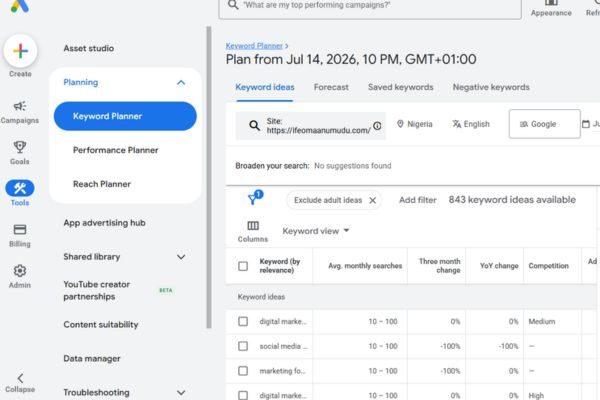
Before you write, search your main keyword and look at what’s already ranking. Are the top results how-to guides? Product pages? Short answers? This tells you the search intent behind the keyword, meaning what people actually want when they type it in.
Matching that intent is one of the fastest ways to improve your chances of ranking.
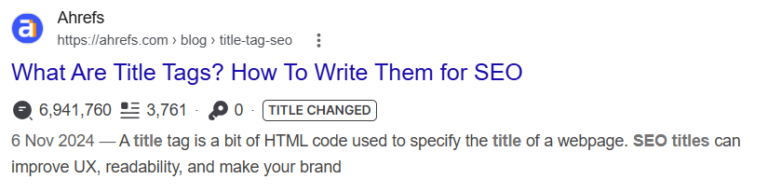
Your title tag and URL carry some of the strongest ranking signals on the entire page, according to Google’s own guidance on writing good titles. Google is clear that a good title should be unique, concise, and should accurately describe the content of the page.
Put your main keyword near the beginning of your title. Keep the whole title under 60 characters so it doesn’t get cut off in search results. And make sure it’s a title a real person would want to click, not just a keyword crammed into a sentence.
Your URL, or slug, should be short and include your main keyword. Skip filler words like “the,” “and,” or “how-to.” A slug like /optimize-blog-post-seo/ is far more SEO-friendly than something long and cluttered with extra words.
The ideal length for a blog post URL slug is 3 to 5 words or roughly 30 to 50 characters.

Headings aren’t just for looks. They help readers scan your post, and they help Google understand your content structure.
Your H1 is your main headline, and it should only appear once per page. It should include your main keyword, just like this post’s title does. From there, use H2s to break your post into major sections, and H3s for smaller subsections within those.
Try to include your main keyword in at least one H2, and work your secondary keywords into a few others.
Your introduction has one job: convince someone to keep reading instead of hitting the back button. On the web, people scan before they commit to reading, so your first few sentences carry a lot of weight, both for readers and for Google.
A simple way to structure it is the Agree, Promise, Preview method. Agree with the reader by naming the problem they’re likely facing. Promise that this post will solve it. Then preview what’s coming so they know exactly what they’re about to get.
Keep your introduction between 100 and 150 words, and mention your main keyword naturally within the first paragraph. This tells both the reader and Google what the post is about right away, before either one loses patience.
Once your headings are set, weave your main keyword into the body of your post. A good rule of thumb is to include it in the introduction, once or twice in the middle, and again near the conclusion.
Don’t force it. If a sentence sounds awkward because you crammed a keyword into it, rewrite the sentence. Google’s algorithms are built to reward content that reads naturally and actually satisfies what the searcher is looking for, not content that repeats a phrase over and over.
Your meta description is the short summary that shows up under your title in Google search results. While Google states plainly that meta descriptions aren’t a direct ranking factor, a well written one can still make the difference between someone clicking your link or scrolling past it.
Keep your meta description under 160 characters, include your main keyword near the start, and write it like a mini pitch for your post. If you want a full walkthrough on nailing this step, I wrote a complete guide on how to write a meta description that actually gets clicks.
Images make your post more engaging, but they also come with their own SEO opportunities that a lot of small business owners skip entirely.
Alt text is a short description attached to each image on your page. It helps visually impaired readers using screen readers understand what the image shows, and it gives search engines more context about your content, according to Google’s image SEO documentation.
Write a clear, honest description of the image. Something like “small business owner writing a blog post on a laptop” is far more useful than leaving the field blank or stuffing it with keywords.
Before you upload an image, rename the file itself. A name like optimize-blog-post-seo.jpg gives Google a small but real clue about the image’s subject matter, while a name like IMG4820.jpg tells it nothing at all.
Links do more work than most people realize. Internal links guide readers to more of your content and help Google crawl and understand how your pages connect to each other.
Use external links to cite credible sources for statistics or supporting information.
Every post you publish should link to at least one other relevant page or post on your website. Google’s own documentation notes that every page you care about should have a link from at least one other page on your site, since links help both readers and search engines find and make sense of your content.
For example, this post links back to my earlier guide on writing meta descriptions, because it’s directly related and gives readers somewhere useful to go next. Don’t skip external links either. Linking out to a trustworthy source helps establish your content as credible and well-researched.
Readability affects how long someone stays on your page, and that matters just as much as the words themselves. Use short sentences. Use short paragraphs, ideally two to three sentences each. Break up long sections with bullet points or numbered lists whenever it makes sense.
Avoid overly technical language unless you’re writing for a technical audience. Your goal is for people to read your post on their phone during a coffee break and actually understand it the first time through.
Google pays attention to whether the person behind a piece of content actually knows the topic. This is part of what’s known as E-E-A-T, short for Experience, Expertise, Authority, and Trustworthiness, and it plays into how Google evaluates content quality.
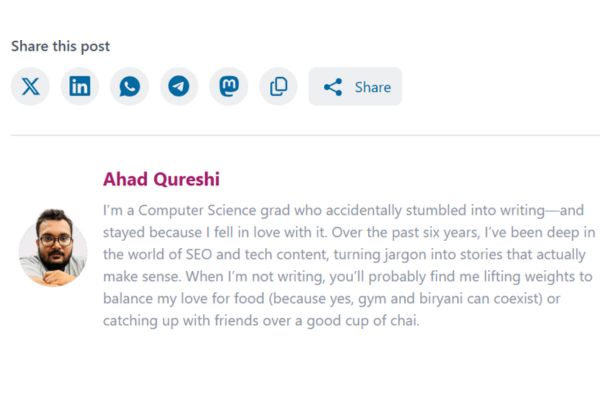
You don’t need a long resume to show this. A short author bio at the end of your post, with your name, your role, and a line or two about your experience, does the job. Add a professional photo if you can. Keep it honest and specific to you.
A post that just stops leaves readers unsure what to do next. Close with one simple call to action, whether that’s booking a call, joining your email list, or reading a related post on your site. Keep it to a single clear ask so it doesn’t compete with the rest of your content.
Here’s the full on-page SEO checklist for beginners, condensed so you can run through it on your next post:
You don’t need to master every part of SEO overnight. Pick one recent post, run it through this checklist, and republish it. Small, consistent fixes like these are exactly what build organic traffic and stronger search engine rankings over time, and they’re well within reach even if you’re not the technical type.
That’s the whole point of SEO tips for small business blog owners like you: practical, actionable steps that fit into a business you’re already running.
Share this post


This workbook provides a step-by-step framework for building and executing a winning strategy. It contains everything that you need to grow on social media and attract more customers online. You’ll also receive 4 exclusive bonuses worth $40 at no extra cost!
Driving growth through innovative digital marketing strategies that increase brand visibility, engagement, and conversions for lasting success.
© Copyright 2026 Ifeoma Anumudu – All Rights Reserved.