

Knowing how to write a good SEO meta description that gets clicks is one of the simplest on-page SEO skills you can pick up and one of the most overlooked. That short block of text sitting under your page title in Google? It’s your one shot to convince a real person to choose your result over the nine others on the page.
It doesn’t directly affect your Google ranking. But it does affect your click-through rate (CTR), and a higher CTR sends a positive signal to Google that your page is relevant. So indirectly, a well-written meta description does move the needle.
In this post, you’ll learn the traits of a good meta description, common mistakes to avoid, practical tips you can apply today, and how tools like Yoast SEO can help you get it right. There are also ready-to-use examples for small business websites.
Simply put, a meta description is a summary of what your page is about. It shows up in Google search results, right below your page title and URL. You’ve seen them thousands of times; they’re those two lines of text that help you decide whether a result is worth clicking.
And knowing how to write a good SEO meta description that gets clicks is exactly what separates a page that brings in traffic from one that gets ignored.
Think of your meta description as a mini-ad for your page. Its one job is to convince someone to click on your link instead of the nine others on the page.
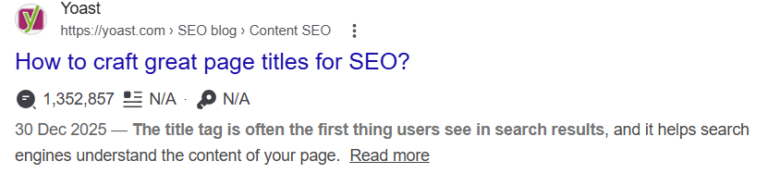
When more people click your result, your click-through rate (CTR) goes up. A higher CTR sends a positive signal to Google that your page is relevant and useful, which can indirectly improve your rankings over time.
One more thing worth knowing: Google doesn’t always use the meta description you write. Sometimes it pulls a snippet from your page content instead, especially if it thinks that’s more relevant to the search query.
That’s frustrating, but it’s not a reason to skip writing one. A well-written meta description gives Google something good to work with, and it shows up more often than you’d think.
No, a meta description is not a direct ranking factor. Google has confirmed this publicly, and writing a keyword-stuffed meta description won’t move you up the rankings.
But here’s the indirect connection you shouldn’t ignore.
When your meta description is compelling, more people click on your result. A higher click-through rate (CTR) tells Google that searchers find your page relevant. Over time, that engagement signal can contribute to better rankings. So while it’s not a direct ranking booster, it supports your SEO in a real way.
For small business owners who are just starting with SEO, this is a low-effort, high-impact place to start. You don’t need any technical skills. You just need to know what to write.
So knowing how to write a good SEO meta description is your best tool for standing out in search results without spending a single dollar on ads.
Google typically displays between 150 and 160 characters on desktop and around 120 on mobile. If your meta description goes over that, Google cuts it off with a “…” and that’s rarely a good look.
Quick tip: Always write your meta description for mobile first. More than half of all Google searches happen on mobile devices, so shorter and punchier is usually better.
What happens if you leave the meta description blank? Google will auto-generate one by pulling random text from your page. Sometimes it’s okay. But more often than not, it looks awkward and doesn’t encourage anyone to click.
A free tool worth bookmarking: SERPSim lets you preview how your title and meta description will look in Google search results before you publish. It’s a quick sanity check that takes 30 seconds.
This is the core of it. A good meta description isn’t just a sentence that describes your page; it’s a sentence (or two) designed to make someone want to click. Here’s what it needs to include:
Start with the keyword you’re trying to rank for. When someone searches for that term, Google bolds the matching words in your snippet. This instantly catches the eye and reassures the reader that your page answers their exact question.
Weak: “We offer a wide range of services to help your business grow online with our expert team.”
Stronger: “Learn how to write a meta description that gets more clicks, with examples built for small business owners.”
Words like learn, discover, get, find out, avoid, and fix make your description feel active. They tell the reader what they’ll be doing when they click, and that’s motivating.
Compare “Information about meta descriptions” vs. “Learn how to write a meta description in 5 simple steps.” The second one has direction. It tells you what you’re going to do.
Use “you” and “your.” It sounds simple, but writing directly to the person reading makes the description feel personal rather than generic. You’re talking to them, not at them.
Answer the unspoken question every searcher is asking: “What’s in it for me?” Your meta description should give them a reason to click. What will they learn? What problem will be solved? What will be different after they read your page?
Instead of “This post explains meta descriptions,” try “Find out how to write a meta description that gets more clicks without rewriting your whole page.”
Words like today, in minutes, without, even if, and step-by-step can add a light sense of urgency or curiosity. Use them when they fit naturally. Don’t force them and definitely don’t go full clickbait. That erodes trust and can hurt your bounce rate when people feel misled.
Keep it between 150–160 characters (120 for mobile priority). If you’re using Yoast SEO or Rank Math on WordPress, both plugins have a built-in character counter that turns green when you’re in the ideal range. That little color indicator is your best friend.
Let’s look at three real-world scenarios to make this concrete.
Example 1: A Local Bakery (Service/Product Page)
Weak: “Welcome to Sweet Crumbs Bakery. We bake delicious cakes, breads, and pastries for all occasions. Visit us today.”
Why it’s weak: Vague, no benefit, no action, doesn’t answer any specific search intent.
Strong: “Freshly baked custom cakes for weddings, birthdays & events in [City]. Order online or visit our bakery. Ready in 48 hours.”
Why it works: Specific, includes location, tells you what they offer, and gives a clear timeline (a great benefit).
Example 2: A Virtual Assistant (Service-Based Business)
Weak: “I am a virtual assistant who offers admin and digital marketing services to small businesses online.”
Why it’s weak: Flat and forgettable. Reads like a resume bullet point, not a click-worthy snippet.
Strong: “Overwhelmed by admin tasks and social media? I help small business owners stay organized and grow online. Let’s talk.”
Why it works: Opens with a pain point, speaks directly to the reader, and ends with a soft CTA.
Example 3: A WooCommerce Product Page
Weak: “Blue Linen Tote Bag. Available in multiple sizes. Add to cart.”
Why it’s weak: No benefit, no personality, no reason to click over any other tote bag listing.
Strong: “Our blue linen tote bag is lightweight, eco-friendly & fits everything. Free shipping on orders over $40. Shop now.”
Why it works: Highlights three benefits quickly, includes a purchase incentive, and uses a direct CTA.
If your site runs on WordPress, adding a meta description is straightforward; you just need the right plugin installed. An SEO plugin helps you write a good meta description that gets clicks without racking your brain over every word.
Yoast SEO is one of the most popular SEO plugins for WordPress, and it makes adding meta descriptions easy.
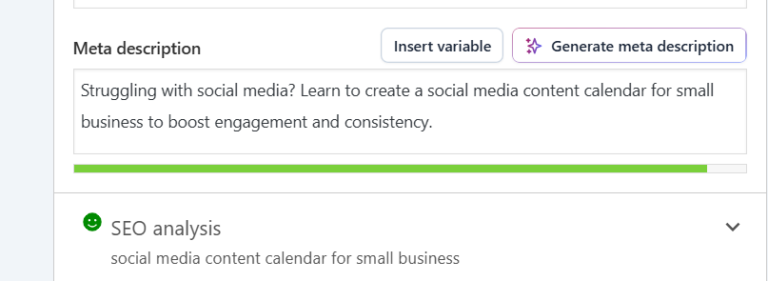
Rank Math works very similarly. Scroll down to the Rank Math panel beneath your post editor, click “Edit Snippet,” and paste your meta description into the “Description” field. Same idea, slightly different layout.
Don’t forget your old posts. Go back through your five most-visited pages and update their meta descriptions using what you’ve learned here. It’s one of the quickest wins in on-page SEO.
Even with the best intentions, these mistakes are easy to make. Check your existing pages against this list:
Your meta description is the first impression your page makes in search results. It’s a small piece of copy that takes maybe five minutes to write well, but most people either skip it or write something forgettable.
Now you know the difference between a description that gets scrolled past and one that gets clicked. Lead with your keyword, write for the reader, make the benefit obvious, and keep it under 160 characters.
Here’s your action step: Go back to your last three published posts right now. Pull up the Yoast SEO or Rank Math panel, and rewrite each meta description using the formula you learned here. It’s a 15-minute task that can meaningfully improve your click-through rate.
If you’d like help auditing your website’s on-page SEO, meta descriptions, title tags, headings, and all, that’s exactly the kind of work I do. Get in touch here, and let’s take a look at your site together.


This workbook provides a step-by-step framework for building and executing a winning strategy. It contains everything that you need to grow on social media and attract more customers online. You’ll also receive 4 exclusive bonuses worth $40 at no extra cost!
Driving growth through innovative digital marketing strategies that increase brand visibility, engagement, and conversions for lasting success.
© Copyright 2026 Ifeoma Anumudu – All Rights Reserved.