
You’ve been posting consistently on social media, but is it actually working? Most small business owners glance at their likes, check their follower count, and move on, but those two “vanity” numbers don’t tell you if your content is actually making you money.
The good news is that tracking your performance doesn’t require a marketing degree or expensive software. Here is how to measure social media success for your small business using the metrics that actually matter for your business growth.
Let’s start here because this is where most people go wrong.
Likes and follower count are easy to see. They sit right there on your profile. So it makes sense that most small business owners use them as the main measure of how well their social media is doing.
But here’s the problem. A post can get 200 likes and bring in zero customers. A post with 12 likes can lead to three enquiries and two sales. The number of hearts on a photo does not tell you whether your content is doing its job.
Follower count is the same story. Growing slowly is completely normal for a small business, especially in the early stages. A small, engaged audience that knows and trusts you will always outperform a large following that never interacts with your content.
What actually matters is whether your content is reaching the right people and moving them to take some kind of action. That’s what we’re going to focus on.
Here’s something most people skip, and it’s the reason measuring feels confusing.
You can’t measure success if you don’t know what success looks like for your business.
Before you open your Insights or check any analytics, decide what you’re trying to achieve. Different goals need different numbers. Trying to track everything at once leads to information overload and no clear direction.
For most small businesses, goals fall into one of three categories:
Awareness means getting more people to know you exist. If this is your goal, you’ll focus on reach and impressions.
Engagement means building a real connection with your audience. If this is your goal, you’ll focus on engagement rate, comments, saves, and shares.
Conversions means getting people to buy, book, or enquire. If this is your goal, you’ll focus on website traffic from social media, link clicks, and direct messages.
Pick one main goal for now. Once you know what you’re working toward, measuring your social media performance becomes much more straightforward.
Here are the numbers worth paying attention to. For each one, you’ll find a plain explanation of what it is, why it matters, and what to do if it’s not where you want it to be.
Reach is the number of individual people who saw your post. Not how many times it was shown, but how many unique people actually saw it.
This is one of the most useful social media metrics for small business owners because it tells you how far your content is spreading. If your reach is growing over time, more new people are discovering you. If it’s flat or dropping, your content isn’t getting pushed out to new audiences.
What to do if your reach is low: post more consistently, experiment with short-form video like Reels or TikTok, and use a handful of relevant hashtags.
According to data published by Loopex Digital, Instagram Reels maintain an average organic reach rate of 30.81%, which is more than double the reach you get from standard image posts. So if you haven’t tried video yet, that’s worth testing.
Impressions count the total number of times your post was displayed, including when the same person sees it more than once.
One person scrolling past your post three times gives you three impressions but only one reach.
If your impressions are high but your reach is low, it means the same group of people keeps seeing your content. That’s not always a bad thing. It shows your existing audience is engaged. But it also means you need to work on getting in front of new people.
Engagement rate is one of the most important social media metrics for small business, and it’s one of the most ignored.
It measures how many people who saw your post actually did something: liked it, commented, shared it, or saved it. It’s shown as a percentage of your reach.
Why does this matter more than raw likes? Because it shows whether your content is actually connecting with people. A post seen by 1,000 people that gets 50 interactions is performing better than a post seen by 5,000 people that gets the same 50 interactions.
According to Socialinsider’s 2026 benchmarks, LinkedIn’s average engagement rate sits at around 5.20%, while Instagram’s average is 0.48%. So what counts as a good number depends on which platform you’re on. For smaller Instagram accounts with under 10,000 followers, engagement rates of up to 5.5% are achievable. If you’re just starting out, don’t compare yourself to large brand accounts. Compare yourself to your own previous results.
What to do if engagement is low: ask questions in your captions, use polls and interactive stories, and post content your audience genuinely finds useful or relatable.
This is where social media performance starts connecting to real business results.
Website traffic from social media tells you how many people clicked through from your posts to your website. If your goal is to get people to book a service, buy a product, or fill out a contact form, this number is one of the most important ones to track.
In Google Analytics 4, you can find this by going to Reports, then Acquisition, then Traffic Acquisition. Look for “Organic Social” in the channel list. This shows you which platforms are sending people to your site and how many visitors you’re getting from social media overall.
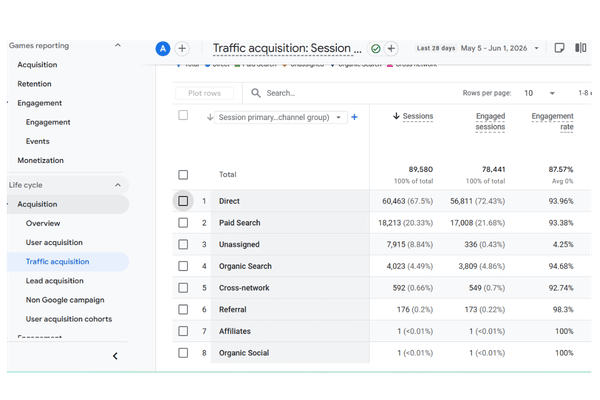
If your website traffic from social is low, check two things. First, are you including a clear call to action in your posts? Second, is your bio link pointing to the right page?
These two actions are the most underrated signals on social media, and small business owners rarely pay attention to them.
A save means someone found your post useful enough that they want to come back to it later. A share means they trusted your content enough to put it in front of their own audience. Both tell you that your content is genuinely helping people, not just entertaining them for a second before they scroll on.
According to Rival IQ’s analysis of over 4 million posts, saves and shares are among the strongest indicators of content quality and resonance. If you want to create more content that gets saved and shared, focus on practical tips, step-by-step guides, and posts that solve a specific problem.
Total followers is a vanity number. Follower growth rate is something worth tracking.
The growth rate tells you how quickly your audience is expanding over time. A slow, steady climb month after month is a healthy sign. A sudden spike followed by weeks of nothing usually just means one post did well, not that your overall strategy is working.
The easiest way to track this as a small business owner: note your follower count on the first of every month. At the end of the month, calculate the difference. Even a simple spreadsheet is enough to spot trends over time.
This is the most direct measure of social media ROI for a small business, and it’s the one that connects most directly to your income.
Track how many direct messages, contact form submissions, phone calls, or bookings are coming from social media. The simplest way to do this is to ask new customers how they found you. Add a short question to your enquiry form or just ask during an initial call.
If you want to track it more precisely, use a specific link in your bio that goes to a dedicated landing page or contact form. That way you know exactly how much traffic is coming from social media.
You don’t need paid tools to get started. Every major platform has free built-in analytics that give you everything covered above.
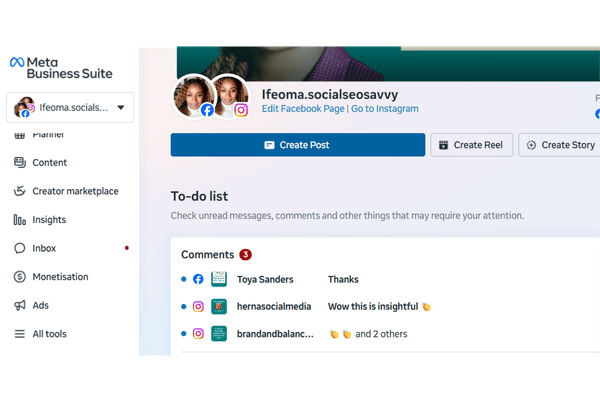
Facebook and Instagram: Go to Meta Business Suite or open the Insights tab on your page or profile. You’ll find reach, impressions, engagement, and follower growth all in one place.
LinkedIn: Click the Analytics tab on your business page, or scroll to the bottom of any post and click “View analytics” to see impressions, clicks, and engagement for that specific post.
TikTok: Go to your profile, tap the three lines in the top right corner, then tap Creator Tools and select Analytics. You’ll see reach, views, follower growth, and more.
Website traffic from social: Google Analytics 4 is a free platform from Google that tracks how people interact with your website and where your traffic is coming from, including which social media platforms are sending visitors your way. Set it up at analytics.google.com and check it once a month alongside your platform analytics.
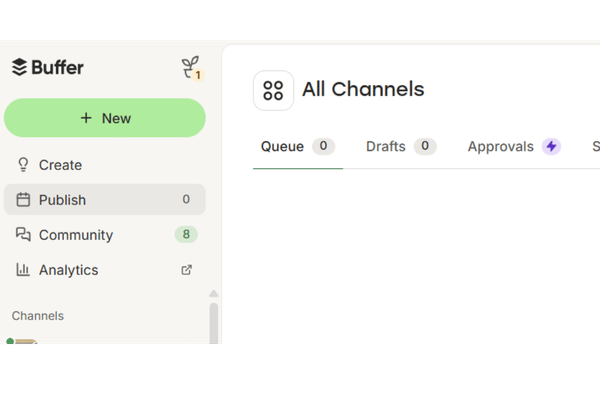
If you use a scheduling tool like Later or Buffer, both free plans include basic post analytics that pull your numbers into one dashboard, which saves time if you’re managing more than one platform.
Not every day. Checking your numbers daily leads to overthinking and reacting to short-term noise instead of real patterns.
Here’s a simple review routine that works for most small business owners:
Weekly: A quick check on reach and engagement for recent posts. Just five minutes to see what’s getting traction.
Monthly: A deeper look at your best and worst performing content, follower growth, and website traffic from social. Note what worked and what didn’t.
Quarterly: Compare your monthly results side by side. Look for patterns. Are certain content types consistently outperforming others? Is reach growing over time? Use what you find to adjust your content plan for the next quarter.
One bad post doesn’t mean your strategy is broken. One great week doesn’t mean you’ve cracked it. Trends over time are what tell the real story.
Data is only useful if you do something with it.
If certain posts consistently get high saves and shares, make more of that type of content. That’s your audience telling you what they find valuable.
If your reach is low, look at your posting frequency and whether you’re using video. Reels and short-form video consistently get the widest organic reach across most platforms right now.
If engagement is low, look at whether you’re actually giving people a reason to respond. Are you asking questions? Are your captions interesting enough to stop the scroll?
If website traffic from social is low, check your calls to action. Every post that’s meant to drive people to your website needs a clear, specific instruction. “Click the link in bio” is not enough on its own. Tell people exactly what they’ll find when they get there.
Keep a simple monthly log in a Google Sheet with these columns: date, platform, top performing post, reach, engagement rate, and website clicks. After three to six months, this log becomes your personal guide to what works for your specific audience. No guesswork needed.
Start small. Pick two or three metrics that match your current goal and focus on those for the first month.
If you’re working on awareness, track reach and follower growth rate.
If you’re working on engagement, track engagement rate, saves, and shares.
If you’re working on getting more customers, track website traffic from social and leads or enquiries.
Once those feel familiar, add more to your tracking routine. The goal is to build a habit of checking your numbers regularly, not to become a data analyst overnight.
When you know how to measure social media success for small business properly, posting stops feeling like a guessing game.
You stop wasting time on content that doesn’t move the needle. You start doing more of what actually gets results. And you have real numbers to show for the time you’re putting in.
Here’s a quick recap of the metrics worth tracking:
Check your platform analytics once a week. Do a proper monthly review. Adjust your content based on what the numbers tell you.
Not sure what your social media numbers are actually telling you? That’s exactly the kind of thing I help small business owners figure out. Get in touch here , and let’s take a look together.
This workbook provides a step-by-step framework for building and executing a winning strategy. It contains everything that you need to grow on social media and attract more customers online. You’ll also receive 4 exclusive bonuses worth $40 at no extra cost!
Driving growth through innovative digital marketing strategies that increase brand visibility, engagement, and conversions for lasting success.
© Copyright 2026 Ifeoma Anumudu – All Rights Reserved.