


If you’ve ever sat there staring at your phone, wondering what to post on social media for a small business, you’re not alone. Most small business owners go through this every single week. The problem isn’t that you’re not creative. The problem is that you don’t have a system.
This post gives you one. You’ll walk away with 20 post ideas you can use right now, plus a simple way to never run out of content again.
Running a business is already a full-time job. You’re handling orders, managing customers, chasing invoices, and trying to keep everything running. Sitting down to create social media posts feels like one more thing on an already long list.
Most small business owners also don’t have a marketing background. They didn’t go to school for this. So when they hear advice like “just be authentic” or “create value-driven content,” it doesn’t actually help them figure out what to post today.
And then there’s the pressure to be creative every single day. That burns people out fast.
Social media posting doesn’t have to be so hard. Once you have a list of go-to content ideas, it gets a lot easier and a lot faster.
Before we get into the ideas, let’s talk about why having categories for your posts changes everything.
Content pillars are just buckets. You pick three to five themes that make sense for your business, and then you rotate through them. That’s it.
Why does this work? Because it stops you from having to think of something brand new every time you post. Instead of starting from scratch, you just ask yourself: “Which pillar am I posting from today?”
For most small businesses, these five pillars work really well:
Educational — teach your audience something they want to know.
Promotional — talk about what you sell and why it matters.
Behind-the-Scenes — show the real, human side of your business.
Engagement — invite your audience to respond, comment, or interact.
Social Proof — share reviews, results, and customer stories.
A good mix is roughly 80% value-based content (educational, behind-the-scenes, engagement, social proof) and 20% promotional. If every post is trying to sell something, people will tune you out quickly.
Now let’s fill each pillar with real ideas.
Here’s your go-to list. You don’t have to use all of them. Pick five or six that feel right for your business and start there.
1. A tip your customers wish they knew sooner.
Think about the advice you give people all the time. That’s a post. A florist could share how to make bouquets last longer. A personal trainer could share a quick warm-up routine. Whatever you know, your audience wants to learn it from you.
2. Answer a question you get asked all the time.
Check your inbox or DMs. What do customers ask you over and over? Turn that into a post. These perform well because someone is always searching for that exact answer.
3. A common mistake people make in your industry.
This one builds a lot of trust. You’re showing that you know your field well enough to spot where people go wrong. It also helps your audience avoid a headache, which they appreciate.
4. A simple how-to or step-by-step guide.
Break something down into three to five steps. Keep it short and easy to follow. Step-by-step posts get saved a lot, which is a great signal for the algorithm.
5. A fact or stat your audience would find interesting.
Find something surprising related to your industry and share it. For example, did you know that 58% of consumers discover new businesses through social media? If you’re a marketing VA, that’s a stat worth sharing with your audience.
6. Highlight one product or service properly.
Not just “buy this.” Explain what it is, who it’s for, what problem it solves, and what the result looks like. One product per post. Keep it focused.
7. Share a limited-time offer or upcoming sale.
Create a sense of urgency. Tell people exactly what the deal is, when it ends, and how to grab it. Clear beats clever every time.
8. Introduce (or re-introduce) yourself.
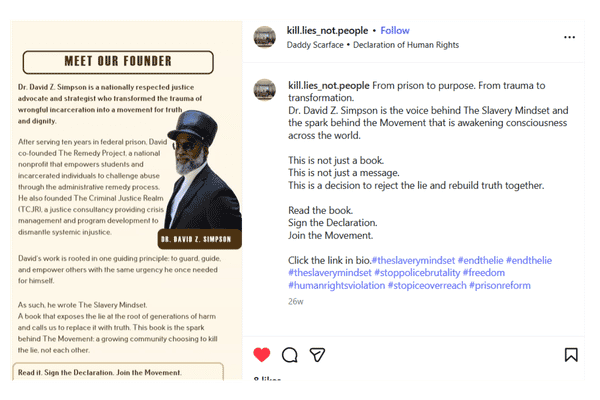
New followers don’t know who you are. Existing followers forget. Share your story, what you do, who you help, and why you started. These posts almost always get warm engagement.
9. Talk about what makes your business different.
Why should someone choose you over someone else? Don’t be shy about this. If you offer faster turnaround, more personal service, or a money-back guarantee, say it plainly.
10. Announce something new.
A new product, a new service, a new working hour, a new team member. People like updates. It shows your business is growing and active.
11. Show your workspace.
Your desk, your shop floor, your van, your home office. People are curious about where the work actually happens. These posts feel real in a way that polished graphics don’t.
12. A day in the life.
Walk people through what a typical workday looks like. Morning routine, client calls, order packing, whatever applies to you. These perform really well because they’re relatable and personal.
13. Your origin story.
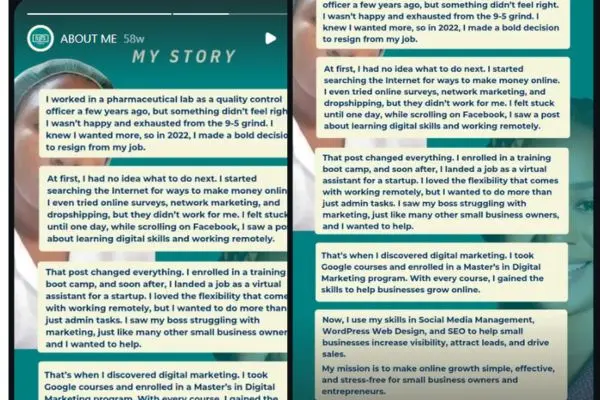
How did you start? What problem were you trying to solve? What was the moment you decided to go for it? People connect with stories, not just services.
14. Show your process.
How do you make, bake, build, design, or deliver what you offer? Pull back the curtain. Even if the process feels ordinary to you, it’s interesting to someone who has never seen it before.
15. Introduce yourself or your team.
Put a face to the business name. If you’re a solopreneur, share a photo of yourself doing the work. If you have a team, feature them one at a time. People buy from people.
16. Ask a simple question.
“What’s your favourite way to spend a Sunday?” or “Which would you choose: A or B?” Easy questions get easy answers, and comments boost your reach.
17. Run a poll.
Facebook and Instagram both have built-in poll features. Use them. “Would you rather… this or that?” type polls take two seconds to answer, and people love participating.
18. Ask for their opinion on something in your business.
“We’re thinking of adding [new product/service]. Would you use it?” This makes your audience feel involved, and it gives you useful feedback at the same time.
19. Share a relatable struggle.
Something real about running your business that other people can relate to. Keeping it honest makes you more likeable and usually sparks a lot of comments from people who feel the same way.
20. Start a fun challenge or caption contest.
Post a funny or interesting photo and ask people to caption it. Or create a simple challenge related to your niche. These can spread quickly when people tag their friends.
These don’t fit neatly into one pillar, but they’re some of the most powerful posts you can share.
Screenshot a customer review and turn it into a graphic. Share a before-and-after if your product or service produces visible results. Re-share a post where a customer tagged you.
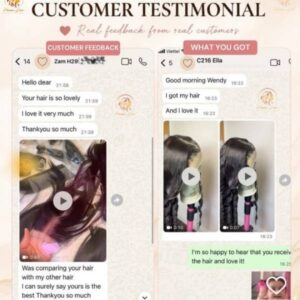
Social proof works because it’s not you saying you’re good. It’s someone else saying it. According to research, user-generated content influences purchasing decisions almost 10 times more than influencer content. That’s a number worth paying attention to.
Having ideas is a great start. But how you execute those ideas matters too. Here are a few practical tips that make a real difference.
Always include a visual. Posts with images or video consistently outperform text-only posts across every platform. You don’t need a professional photographer. A clear, well-lit photo taken on your phone is enough to start.
End every post with a call to action. Tell people what to do next. “Save this.” “Drop your answer in the comments.” “Click the link in bio.” Without a clear next step, most people just scroll past.
Write for easy reading. Short sentences. Short paragraphs. Line breaks between ideas. On mobile, a wall of text looks like work. Make it easy to read.
Post when your audience is online. Check your page Insights to see when your followers are most active. Research from Sprout Social suggests mid-morning on weekdays tends to work well across most platforms, but your own data will tell you more than any general guide.
Reply to your comments. Posting and then disappearing is a missed opportunity. When someone takes the time to comment, reply. It builds community and tells the algorithm your content is worth showing to more people.
Even with 20 ideas in front of you, there will be days when your mind goes blank again. Here’s how to build a system that keeps ideas flowing.
Keep a running notes list on your phone. Whenever a post idea pops into your head, write it down before you forget it. Ideas come at strange times. Capture them.
Save posts that inspire you. When you see something you like from another account, save it. Not to copy, but to spark your own version.
Repurpose what you already have. A blog post can become five social media posts. A tip post can become a short video. A glowing review can become a graphic. You don’t always need new material. You just need a new format.
Pay attention to what your audience responds to. Your Insights tell you which posts get the most reach, saves, and comments. Do more of what’s already working.
Plan around what’s coming up. Seasonal events, local happenings, industry awareness days, your own promotions. When you know something is coming, you can plan content around it well in advance. If you need help with that, this guide on building a monthly social media content calendar walks you through the whole process step by step.
This free 4-Month Content Ideas Guide gives you content ideas for four full months, designed for service-based businesses, product-based businesses, and digital creators.
One last thing worth mentioning. You don’t need to master every platform. You don’t need to post three times a day. Research shows that posting two to five times per week consistently outperforms daily posting for many small businesses, because consistency matters more than volume.
Pick one or two platforms where your audience actually spends time. Show up regularly. Use the ideas in this post. Keep it simple.
That’s really all it takes to get started.
You now have 20 ideas for what to post on social media for small business. You don’t have to use all of them at once.
Pick five. Write your captions. Grab your visuals. Schedule them out using a free tool like Meta Business Suite, Buffer, or Later. Then check back in at the end of the week and see what landed.
Rinse and repeat.
Social media doesn’t have to feel like a mystery. With a clear list of ideas and a simple routine, it becomes something you can actually keep up with, without the stress.
Managing social media on top of everything else feeling like too much? That’s exactly what I help small business owners with. Get in touch here and let’s talk about what’s possible.


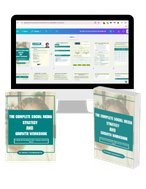
This workbook provides a step-by-step framework for building and executing a winning strategy. It contains everything that you need to grow on social media and attract more customers online. You’ll also receive 4 exclusive bonuses worth $40 at no extra cost!
Driving growth through innovative digital marketing strategies that increase brand visibility, engagement, and conversions for lasting success.
© Copyright 2026 Ifeoma Anumudu – All Rights Reserved.